
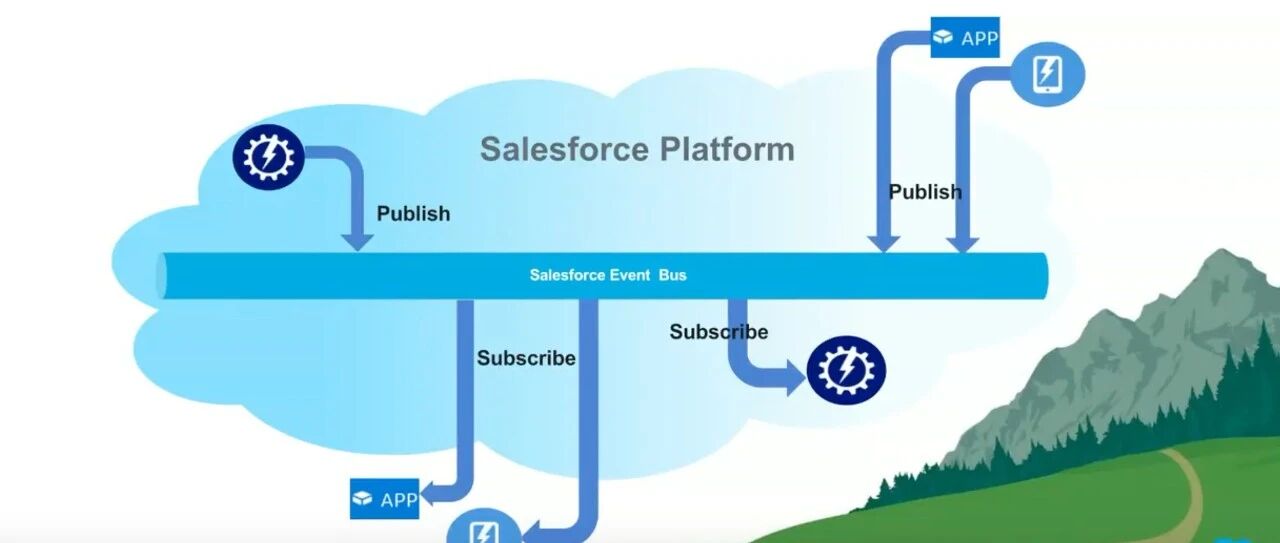
An Apex trigger often starts with a small responsibility and gradually accumulates expensive work: calculations, integrations, and updates across several objects. Eventually, that work needs a transaction of its own.
My original article explored using a Platform Event to wake an asynchronous worker, while keeping the actual work in persistent Salesforce records. The separation is still useful, but the event should be a notification rather than the only copy of the business request.
Why simply enqueueing more jobs can fail
A straightforward response to slow trigger work is to move it into a future method or a Queueable job. That can be appropriate, but the calling context matters. Synchronous and asynchronous transactions have different enqueue limits, and several triggers in one transaction may share the same budget.
Even record counts can be misleading. Two objects processed in separate trigger batches can produce more enqueue attempts than a single combined record count suggests. Repeated DML and recursive updates add further complexity.
Also, moving work into a subscriber does not make every operation legal there. If an Apex Platform Event trigger needs to initiate an HTTP integration, design the handoff to a callout-capable asynchronous job rather than assuming the event trigger can make the callout directly.
Keep the work in records; use the event to signal it
The pattern has three parts:
- Mark or store the pending work. Update a status on the business record, or create a separate work-request record containing the information the worker needs.
- Publish a notification. The event tells the subscriber that work is available.
- Process and acknowledge it. The subscriber queries the durable work, handles an appropriate batch, and records successful completion.
This means a notification does not have to carry every business field. It can be a wake-up signal. Pending work remains discoverable even if a notification is missed or processing stops unexpectedly.
When the subscriber depends on records written by the publishing transaction, configure Publish After Commit. Otherwise, a subscriber may act before the corresponding data is committed. Salesforce describes the distinction in Platform Event publishing behavior.
Make pending work unambiguous
The original design used two timestamps and a formula to identify records needing processing. A useful interpretation is:
RequestedAtrecords the latest requested change.ProcessedAtrecords the request that was successfully handled.- A record is pending when it has a request and either has never been processed or has a newer request than the processed one.
The worker must acknowledge the version it actually handled. If another transaction requests new work during processing, setting ProcessedAt to an unrelated “now” could accidentally clear that newer request. A separate request record or explicit version number can make this easier to reason about.
Timestamp fields are a tracking mechanism, not a locking mechanism. Concurrent workers still need a deliberate ownership or concurrency strategy.
Plan for retries and recovery
Asynchronous processing needs more than a happy path:
- Make repeated processing safe. For an external operation, use an idempotency key that represents the business request.
- Record success only after the required work is confirmed.
- Preserve failure information and retry eligible work deliberately.
- Monitor the age and volume of the backlog.
- Provide a recovery process that can find pending records independently of the event stream.
In this design, a periodic recovery scan can coexist with event-driven processing. The event provides prompt execution; the durable backlog provides a way to catch up. Accepting a missed notification should not mean accepting lost business work.
Update the capacity assumptions
My 2023 article described a single processing stream. That should not be interpreted as an absolute limit for every current implementation. Salesforce documents parallel subscriptions for supported custom high-volume events, with work distributed by a partition key. Ordering and concurrent updates must be considered when selecting that key. See Parallel Subscriptions for Apex Triggers.
Capacity also depends on event allocations, subscriber configuration, batch size, processing time, and downstream limits. Publishing success is not the same as completed business processing. Check the current publishing and subscribing considerations for your org and event type instead of treating an old hourly figure as a universal budget.
When I would use it
Use a Queueable directly when the workflow is simple and the transaction’s enqueue budget is well understood. Consider a durable backlog plus Platform Event notification when several triggers need to hand off work, when the producer and consumer should be separated, or when independent recovery is important.
The valuable idea is not that Platform Events remove limits. It is that they let the trigger signal work while another transaction handles it, with the business state stored somewhere recoverable.
The original demonstration repository provides background for the pattern; adapt any sample to your current requirements and platform version.
Originally published on 2023-08-27. English edition revised on October 3, 2026. Revised capacity assumptions and added durable backlog, concurrency, callout, and recovery considerations. Read the Chinese original.
(Updated: )